> ## Documentation Index
> Fetch the complete documentation index at: https://docs.gigabrain.gg/llms.txt
> Use this file to discover all available pages before exploring further.
# Brain
> Interactive Market Queries
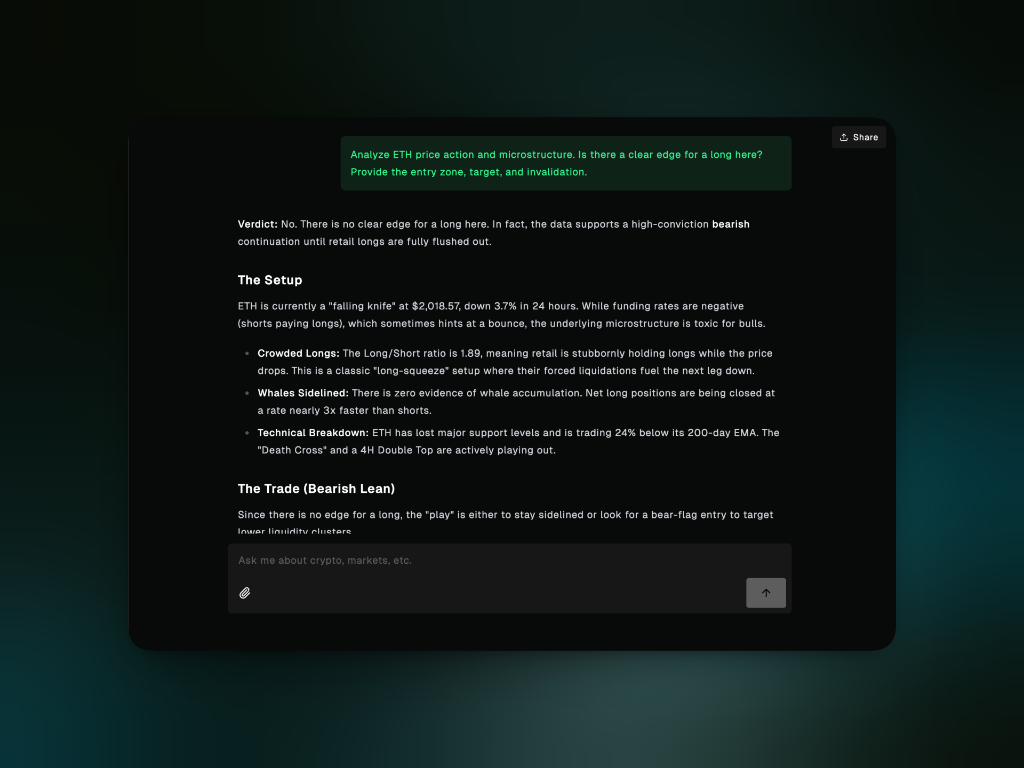 Gigabrain Chat is your conversational interface to The Brain. Instead of scrolling through charts, reading news, and checking onchain data separately, just ask a question and get a synthesized answer with a clear thesis, risk assessment, and invalidation points.
Chat pulls live data from prices, order books, funding rates, onchain metrics, news feeds, and social sentiment. It supports follow up questions with session memory, so you can refine your analysis like you're having a conversation with a trading desk.
## How it works
Pulls current prices, funding rates, whale activity, protocol metrics, news,
and more based on your question
Reasons across macro, positioning, fundamentals, technicals, and sentiment
to build a complete picture
Combines all the data into a clear answer with a verdict, setup, and trade
idea
Remembers your conversation so you can ask follow ups without repeating
yourself
You don't need to specify what data to pull — The Brain figures it out automatically.
## What you can ask
Get actionable trade ideas with entry zones, targets, and invalidation levels. If your exchange is connected, you can execute trades directly from Chat.
**Analysis examples:**
* "Analyze ETH's price movement, key levels, and is it a good time to long?"
* "Give me a BTC trade setup based on the 4H timeframe"
* "What's moving the market today?"
**Execution examples** (requires connected exchange):
* "Long ETH with \$500 at 5x leverage"
* "Buy 0.5 SOL at market price"
* "Close my entire HYPE position"
**What you get:** Current price action, technical levels, momentum analysis, and a clear verdict on whether there's an edge.
Deep dive into protocols, DeFi metrics, and token economics.
**Examples:**
* "What's the TVL and revenue story for Aave?"
* "Deep dive on Aave TVL, revenue, utilization, token metrics"
* "What's the buzz on Solana DeFi?"
**What you get:** Protocol health metrics, revenue trends, competitive positioning, and whether fundamentals support the current price.
Understand leverage, positioning, and where the market is vulnerable.
**Examples:**
* "Is OI spiking on ETH perps, indicating fresh longs?"
* "Funding rates turning negative, short squeeze risk?"
* "Longs at 70%, crowded trade, watch for reversals?"
**What you get:** Funding rates, open interest, long/short ratios, liquidation zones, and whale positioning with interpretation of what it means for price.
Evaluate how broader economic conditions affect crypto.
**Examples:**
* "Fed pivot incoming, risk on for alts?"
* "Risk off mode, BTC tracking Nasdaq downside?"
* "DXY strength pressuring BTC like in 2022?"
**What you get:** Analysis of Fed policy, liquidity conditions, DXY, VIX, yields, and how they're affecting crypto as a risk asset.
Cross reference prediction market odds with crypto and macro data.
**Examples:**
* "Will BTC hit \$100K by EOY? Analyze the odds"
* "What's hot on Polymarket right now for crypto?"
**What you get:** Current odds, trend direction, and whether the prediction market signal aligns with other data.
Run analysis across multiple assets and discover opportunities.
**Examples:**
* "Analyze a portfolio of 50% BTC, 30% ETH, 20% SOL"
* "List all tokens that gained more than 20% in the last 24 hours"
* "Get token unlocks for the next 14 days"
**What you get:** Structured data, rankings, upcoming events, and context on what to watch.
### Custom Models
Chat uses Gigabrain's default model out of the box, but you can bring your own API key to use any model from OpenAI, Anthropic, xAI, or 400+ models via OpenRouter.
Click the **model selector** at the bottom of the chat input to switch models. Connect your API key in [Profile → Integrations → AI Models](https://gigabrain.gg/profile?tab=integrations) first.
See the [Integrations guide](/guides/integrations#ai-models-bring-your-own-key) for setup details.
### Trade Execution
Connect your exchange account to enable direct trade execution from Chat.
1. Navigate to [Profile → Integrations](https://gigabrain.gg/profile?tab=integrations)
2. Select **Hyperliquid**
3. Connect your wallet and authorize trading
4. Return to Chat
Once connected, ask Chat to execute trades directly:
* "Buy 0.1 ETH at market price"
* "Long BTC with \$500, 3x leverage"
* "Place limit order for SOL at \$140"
* "Close 50% of my ETH position"
Chat will confirm the order details before execution. For automated trading without manual approval, use [SuperAgents](/core-features/superagents).
Only connect exchanges you trust and understand the API permissions you're
granting. Always start with small position sizes to test functionality.
## Best Practices
**Vague:** "Tell me about crypto"\
**Better:** "Analyze BTC on the 4H chart. Is this a continuation or reversal setup?"
**5m-15m** - Scalping **1H-4H** - Intraday/swing **1D-1W** - Position trading
"Analyze SOL: fundamentals + technicals + microstructure" When all three
align, you have a stronger edge.
"ETH long at \$2,050. Check for major resistance nearby, funding rate extremes,
and upcoming macro events"
* "Elaborate on the invalidation level" - "What historical precedent supports
this?" - "How does this compare to last FOMC?"
Most useful during market hours, before major events (CPI, FOMC), or when you need a quick read on current conditions.
## What Chat is (and isn't)
✓ Analyzes current market conditions across price, fundamentals, macro, and positioning\
✓ Provides clear theses with entry, target, and invalidation levels\
✓ Synthesizes data from multiple sources into one coherent view\
✓ Maintains conversation context for iterative follow ups\
✓ Pulls live data so analysis reflects current state\
✓ Executes trades directly when your exchange is connected
✗ Make trading decisions for you (it provides analysis, you decide whether to trade)\
✗ Predict the future with certainty (it analyzes current data and patterns)\
✗ Replace your own judgment (it's a tool to inform decisions, not make them)\
✗ Cover non-crypto markets in depth (focus is crypto with macro context)
## Ready to start?
Head to the [Gigabrain Terminal](https://gigabrain.gg/chat) and ask your first question.
Gigabrain Chat is your conversational interface to The Brain. Instead of scrolling through charts, reading news, and checking onchain data separately, just ask a question and get a synthesized answer with a clear thesis, risk assessment, and invalidation points.
Chat pulls live data from prices, order books, funding rates, onchain metrics, news feeds, and social sentiment. It supports follow up questions with session memory, so you can refine your analysis like you're having a conversation with a trading desk.
## How it works
Pulls current prices, funding rates, whale activity, protocol metrics, news,
and more based on your question
Reasons across macro, positioning, fundamentals, technicals, and sentiment
to build a complete picture
Combines all the data into a clear answer with a verdict, setup, and trade
idea
Remembers your conversation so you can ask follow ups without repeating
yourself
You don't need to specify what data to pull — The Brain figures it out automatically.
## What you can ask
Get actionable trade ideas with entry zones, targets, and invalidation levels. If your exchange is connected, you can execute trades directly from Chat.
**Analysis examples:**
* "Analyze ETH's price movement, key levels, and is it a good time to long?"
* "Give me a BTC trade setup based on the 4H timeframe"
* "What's moving the market today?"
**Execution examples** (requires connected exchange):
* "Long ETH with \$500 at 5x leverage"
* "Buy 0.5 SOL at market price"
* "Close my entire HYPE position"
**What you get:** Current price action, technical levels, momentum analysis, and a clear verdict on whether there's an edge.
Deep dive into protocols, DeFi metrics, and token economics.
**Examples:**
* "What's the TVL and revenue story for Aave?"
* "Deep dive on Aave TVL, revenue, utilization, token metrics"
* "What's the buzz on Solana DeFi?"
**What you get:** Protocol health metrics, revenue trends, competitive positioning, and whether fundamentals support the current price.
Understand leverage, positioning, and where the market is vulnerable.
**Examples:**
* "Is OI spiking on ETH perps, indicating fresh longs?"
* "Funding rates turning negative, short squeeze risk?"
* "Longs at 70%, crowded trade, watch for reversals?"
**What you get:** Funding rates, open interest, long/short ratios, liquidation zones, and whale positioning with interpretation of what it means for price.
Evaluate how broader economic conditions affect crypto.
**Examples:**
* "Fed pivot incoming, risk on for alts?"
* "Risk off mode, BTC tracking Nasdaq downside?"
* "DXY strength pressuring BTC like in 2022?"
**What you get:** Analysis of Fed policy, liquidity conditions, DXY, VIX, yields, and how they're affecting crypto as a risk asset.
Cross reference prediction market odds with crypto and macro data.
**Examples:**
* "Will BTC hit \$100K by EOY? Analyze the odds"
* "What's hot on Polymarket right now for crypto?"
**What you get:** Current odds, trend direction, and whether the prediction market signal aligns with other data.
Run analysis across multiple assets and discover opportunities.
**Examples:**
* "Analyze a portfolio of 50% BTC, 30% ETH, 20% SOL"
* "List all tokens that gained more than 20% in the last 24 hours"
* "Get token unlocks for the next 14 days"
**What you get:** Structured data, rankings, upcoming events, and context on what to watch.
### Custom Models
Chat uses Gigabrain's default model out of the box, but you can bring your own API key to use any model from OpenAI, Anthropic, xAI, or 400+ models via OpenRouter.
Click the **model selector** at the bottom of the chat input to switch models. Connect your API key in [Profile → Integrations → AI Models](https://gigabrain.gg/profile?tab=integrations) first.
See the [Integrations guide](/guides/integrations#ai-models-bring-your-own-key) for setup details.
### Trade Execution
Connect your exchange account to enable direct trade execution from Chat.
1. Navigate to [Profile → Integrations](https://gigabrain.gg/profile?tab=integrations)
2. Select **Hyperliquid**
3. Connect your wallet and authorize trading
4. Return to Chat
Once connected, ask Chat to execute trades directly:
* "Buy 0.1 ETH at market price"
* "Long BTC with \$500, 3x leverage"
* "Place limit order for SOL at \$140"
* "Close 50% of my ETH position"
Chat will confirm the order details before execution. For automated trading without manual approval, use [SuperAgents](/core-features/superagents).
Only connect exchanges you trust and understand the API permissions you're
granting. Always start with small position sizes to test functionality.
## Best Practices
**Vague:** "Tell me about crypto"\
**Better:** "Analyze BTC on the 4H chart. Is this a continuation or reversal setup?"
**5m-15m** - Scalping **1H-4H** - Intraday/swing **1D-1W** - Position trading
"Analyze SOL: fundamentals + technicals + microstructure" When all three
align, you have a stronger edge.
"ETH long at \$2,050. Check for major resistance nearby, funding rate extremes,
and upcoming macro events"
* "Elaborate on the invalidation level" - "What historical precedent supports
this?" - "How does this compare to last FOMC?"
Most useful during market hours, before major events (CPI, FOMC), or when you need a quick read on current conditions.
## What Chat is (and isn't)
✓ Analyzes current market conditions across price, fundamentals, macro, and positioning\
✓ Provides clear theses with entry, target, and invalidation levels\
✓ Synthesizes data from multiple sources into one coherent view\
✓ Maintains conversation context for iterative follow ups\
✓ Pulls live data so analysis reflects current state\
✓ Executes trades directly when your exchange is connected
✗ Make trading decisions for you (it provides analysis, you decide whether to trade)\
✗ Predict the future with certainty (it analyzes current data and patterns)\
✗ Replace your own judgment (it's a tool to inform decisions, not make them)\
✗ Cover non-crypto markets in depth (focus is crypto with macro context)
## Ready to start?
Head to the [Gigabrain Terminal](https://gigabrain.gg/chat) and ask your first question.